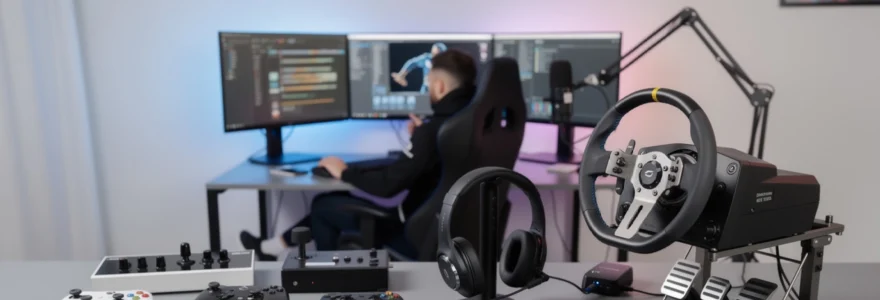
The modern gaming landscape demands precision, immersion, and performance from every peripheral in your setup. Whether you’re competing in esports tournaments, exploring vast open worlds, or racing on virtual circuits, the right gaming hardware can transform your entire experience. Gaming peripherals have evolved far beyond simple input devices, becoming sophisticated tools that directly impact performance, comfort, and enjoyment.
Selecting the appropriate controller, headset, or racing wheel requires understanding your specific gaming needs, platform requirements, and performance expectations. The peripheral market offers everything from budget-friendly options to professional-grade equipment used in major tournaments worldwide. Each category presents unique technologies, design philosophies, and compatibility considerations that significantly influence your gaming experience.
Professional gamers and enthusiasts increasingly recognise that peripheral choice can determine competitive success. Modern gaming hardware incorporates advanced technologies like haptic feedback, spatial audio processing, and precision force feedback systems. Understanding these technologies and their practical applications helps make informed decisions that enhance both casual and competitive gaming experiences.
Controller selection criteria for different gaming genres
Gaming controller selection fundamentally depends on genre requirements and personal preferences. Different game types demand specific input characteristics, response times, and ergonomic considerations. Fighting games require lightning-fast inputs and precise directional control, while racing simulators benefit from analogue trigger precision and customisable button mapping. First-person shooters prioritise low latency and consistent tracking accuracy, making controller choice critical for competitive performance.
Platform compatibility remains a primary consideration when selecting controllers. Modern gaming spans multiple platforms, and cross-platform compatibility has become increasingly important. Many contemporary controllers support multiple systems, offering flexibility for gamers who play across different platforms. However, platform-specific optimisations often provide superior performance on native systems.
Build quality and durability significantly impact long-term satisfaction with gaming controllers. Professional-grade controllers undergo rigorous testing to ensure millions of button presses and stick movements. Premium materials like metal components, reinforced plastics, and high-quality switches contribute to longevity and consistent performance throughout extended gaming sessions.
Xbox wireless controller vs DualSense haptic feedback technology
The Xbox Wireless Controller and PlayStation DualSense represent different approaches to haptic feedback and immersive gaming experiences. Xbox’s approach focuses on refined traditional rumble technology with improved precision and reduced latency. The controller’s impulse triggers provide subtle feedback during specific game actions, particularly effective in racing and shooting games where trigger response directly correlates with in-game performance.
Sony’s DualSense controller revolutionises haptic feedback through advanced actuators that simulate diverse textures and sensations. The DualSense can replicate the feeling of walking on different surfaces, drawing a bowstring, or feeling raindrops hitting an umbrella. This technology creates unprecedented immersion levels, though it requires specific game support to realise its full potential.
The DualSense’s adaptive triggers can dynamically adjust resistance based on in-game actions, creating realistic feedback that enhances gameplay immersion and provides tactical advantages in supported titles.
Battery life considerations differ significantly between these controllers. Xbox Wireless Controllers typically offer longer battery life due to less power-intensive feedback systems. DualSense controllers consume more power due to advanced haptic systems and built-in speakers, requiring more frequent charging during extended gaming sessions.
Fighting game controller requirements: arcade sticks and hitbox configurations
Fighting game controllers demand exceptional precision and reliability for competitive play. Arcade sticks remain the gold standard for serious fighting game enthusiasts, offering superior directional accuracy and button responsiveness compared to traditional gamepads. Japanese Sanwa and Seimitsu components are widely considered the benchmark for arcade stick construction, providing consistent performance under intense competitive conditions.
Hitbox controllers represent an innovative alternative to traditional arcade sticks, replacing joysticks with directional buttons. This configuration allows for frame-perfect inputs and eliminates the physical limitations of joystick movement. Many professional fighting game players have adopted hitbox controllers for their precision advantages, particularly in games requiring complex directional inputs and rapid button combinations.
Button layout customisation becomes crucial for fighting game performance. Different games benefit from specific button arrangements, and personal preference plays a significant role in optimal configuration. Professional players often spend considerable time adjusting button placement and spacing
Button layout customisation becomes crucial for fighting game performance. Different games benefit from specific button arrangements, and personal preference plays a significant role in optimal configuration. Professional players often spend considerable time adjusting button placement and spacing to minimise hand travel and avoid misinputs during high-pressure situations. When choosing between an arcade stick and a hitbox, consider not only the hardware quality but also how easily you can remap buttons and update firmware, as this directly affects long-term usability and tournament readiness.
Precision gaming controllers: SCUF elite series and battle beaver customs
For competitive shooters and action titles, precision controllers like SCUF Elite Series and Battle Beaver Customs offer features beyond standard gamepads. These controllers focus on reduced input latency, remappable rear paddles, and adjustable trigger stops that shorten travel distance for faster firing. For games like Call of Duty, Apex Legends, and Fortnite, shaving milliseconds off each trigger pull can accumulate into a measurable competitive edge over long sessions.
SCUF controllers typically provide extensive modularity, with swappable thumbsticks, adjustable trigger tension, and faceplate customisation. This flexibility allows you to tune stick height and convexity for different gaming genres, from precision sniping to rapid third-person camera control. Battle Beaver Customs, on the other hand, emphasises ultra-fast mechanical face buttons and “smart” bumpers designed for minimal actuation force, appealing to players who prioritise raw input speed over cosmetic customisation.
When evaluating these high-end controllers, focus on three factors: input consistency, remapping software, and durability. Competitive hardware should deliver identical response across thousands of button presses without developing dead zones or stick drift. Serious players also benefit from onboard profile switching, allowing you to store different controller configurations for specific games or roles. While the cost is significantly higher than stock controllers, frequent ranked or tournament players often consider this an investment in performance rather than a cosmetic upgrade.
Retro gaming controller compatibility: 8BitDo and retroflag options
Retro gaming controllers from brands like 8BitDo and Retroflag cater to enthusiasts who emulate classic systems or play retro collections on PC and modern consoles. These controllers replicate iconic layouts from SNES, Mega Drive, or original PlayStation pads while adding modern amenities such as Bluetooth connectivity and configurable buttons. If you regularly switch between platformers, 2D fighters, and old-school RPGs, a retro-style controller can offer more precise D-pad control than many contemporary gamepads.
8BitDo in particular has built a reputation for wide compatibility and robust firmware support. Many of its controllers can connect to PC, Nintendo Switch, Android, and even older mini-consoles, often with simple profile switching on the controller itself. Retroflag focuses more on system-specific shells and cases—like Raspberry Pi console builds—paired with controllers designed to match the look and feel of classic hardware. For retro arcade and platformer fans, a clean, accurate D-pad and low-latency wireless mode matter far more than analog trigger sophistication.
Before purchasing, confirm driver and firmware support for your primary platform and check whether the controller supports XInput mode for Windows gaming. Without XInput, some titles may not recognise the device as a standard gamepad, leading to extra configuration work. You should also consider whether a wired option might be preferable for classic speedrun attempts, where even slight wireless interference could introduce unwanted input delay. Ultimately, the best retro gaming controller will feel familiar in your hands while still offering modern reliability and minimal input lag.
Gaming headset audio engineering and spatial sound technologies
Headsets have evolved from simple stereo devices into complex audio tools that can dramatically alter your gaming awareness. Competitive players depend on accurate positional audio to detect enemy footsteps or distant gunfire, while single-player enthusiasts look for immersive soundscapes that bring virtual worlds to life. Understanding key technologies such as surround sound processing, driver design, and wireless codecs helps you choose a gaming headset that matches both your platform and playstyle.
Beyond raw sound quality, comfort and microphone clarity play a crucial role in long-session usability. Lightweight headbands, breathable ear cushions, and balanced clamping force reduce fatigue during multi-hour sessions. Meanwhile, a well-engineered mic ensures your comms remain clear in team-based games, particularly when background noise is an issue. As with controllers and racing wheels, the right gaming headset can be the difference between casual enjoyment and consistently strong competitive performance.
7.1 surround sound implementation: dolby atmos vs DTS:X audio processing
Virtual 7.1 surround sound has become a standard feature in many mid-range and premium gaming headsets, but not all implementations are equal. Dolby Atmos and DTS:X are two leading spatial audio technologies that aim to create three-dimensional sound fields using standard stereo drivers. Rather than adding more physical speakers, these formats use advanced signal processing and head-related transfer functions (HRTFs) to simulate sound coming from above, behind, and around you.
Dolby Atmos for Headphones integrates deeply with Windows and Xbox platforms, providing per-app configuration and support in many modern AAA titles. It excels at height cues—like helicopters overhead or projectiles arcing above your character—making it particularly effective in shooters and cinematic action games. DTS:X, often delivered via DTS Headphone:X, focuses on detailed positional accuracy and a more neutral sound signature, which can help you pinpoint footsteps and reloading sounds in competitive play.
When choosing between Dolby Atmos and DTS:X, consider your main platform and game library. Many PC and Xbox titles are currently mixed with Atmos in mind, while DTS:X offers broad compatibility through software suites bundled with specific headsets or sound cards. You might ask, do you actually need virtual surround for competitive gaming? In many cases, a high-quality stereo headset with good imaging is enough, but advanced spatial processing can provide subtle cues that dedicated players quickly learn to exploit.
Driver technology comparison: planar magnetic vs dynamic transducers
The heart of any gaming headset is its driver technology, which converts electrical signals into sound. Most gaming headsets use dynamic drivers, which rely on a voice coil and diaphragm design similar to traditional speakers. Dynamic drivers are cost-effective, capable of strong bass response, and relatively easy to tune for different sound signatures—from warm, cinematic audio to brighter, detail-focused profiles.
Planar magnetic drivers, once limited to high-end audiophile headphones, are increasingly appearing in premium gaming headsets. These drivers use a thin, electrically charged diaphragm suspended between magnetic arrays, providing extremely fast response times and low distortion. For competitive players, this translates into cleaner transient sounds—like footsteps or shell casings—standing out clearly from background effects. Planar headsets often deliver a more “studio-like” experience, though they may require more powerful amplification and come at a higher price point.
How do you decide which driver type is right for you? If you value punchy bass and a fun, engaging sound for movies and casual gaming, a well-tuned dynamic-driver headset is usually sufficient. If you prioritise micro-detail, spatial precision, and low distortion at high volumes, planar magnetic headsets might justify their premium cost. Think of dynamic drivers as high-performance road cars—fast and versatile—while planar magnetics resemble finely tuned race machines designed for maximum precision.
Microphone specifications: cardioid vs omnidirectional pickup patterns
Microphone performance is often overlooked when choosing a gaming headset, yet clear voice communication is critical for team-based competitive titles. The pickup pattern of a microphone determines how it captures sound in your environment. Cardioid mics are the most common in gaming headsets; they focus on sounds directly in front of the capsule while attenuating noise from the sides and rear. This makes them ideal for noisy home setups, where keyboard clicks, fans, or other people in the room could otherwise bleed into your comms.
Omnidirectional microphones, as the name suggests, capture sound equally from all directions. While they can offer a more natural and open voice sound in controlled environments, they are less suited to typical gaming conditions with background noise. Some premium headsets and standalone boom mics allow you to switch pickup patterns or adjust sensitivity and noise gates via software, giving you more control over how your voice is presented to teammates or streaming audiences.
When reviewing microphone specs, look beyond marketing labels and consider frequency response and signal-to-noise ratio. A mic with a relatively flat midrange response will present voices more accurately, while built-in noise reduction algorithms can cut down on hums or environmental sounds. If you stream or record content, you may also want sidetone monitoring, which lets you hear your own voice in the headset and avoid shouting during intense matches.
Wireless audio codecs: aptx low latency vs LDAC transmission standards
For gamers who value cable-free setups, wireless audio codecs determine both sound quality and perceived lag between on-screen action and audio. Standard Bluetooth SBC can introduce noticeable latency, which is problematic in rhythm games or competitive shooters. Codecs like aptX Low Latency address this by reducing transmission delay to as little as ~40 ms in ideal conditions, making lip-sync and gunshot timing feel far more natural.
LDAC, originally developed by Sony, focuses more on high-resolution audio quality than absolute latency. It offers much higher bitrates than SBC or standard aptX, preserving more detail in complex soundtracks and open-world ambience. However, LDAC’s latency can be higher than aptX Low Latency, making it better suited for immersive single-player experiences and media consumption than hardcore ranked play. As with many technologies, there is a trade-off between maximum fidelity and lowest delay.
Many dedicated “gaming wireless” headsets avoid Bluetooth latency concerns by using proprietary 2.4 GHz dongles, which typically provide sub-20 ms performance and stable connections. If you also want multipurpose use with phones and tablets, look for headsets that support both 2.4 GHz (for gaming) and advanced Bluetooth codecs (for everyday listening). Always check your platform’s codec support: for example, Windows PCs may require additional drivers or adapters to make best use of aptX Low Latency, while LDAC support is strongest on Android devices and certain consoles.
Racing wheel force feedback systems and compatibility standards
Racing wheels occupy a unique space in the gaming hardware ecosystem, transforming driving games into highly realistic simulations. The difference between a basic gear-driven wheel and a high-torque direct drive base can feel as dramatic as switching from a road car to a full race machine. Force feedback systems simulate tyre grip, surface texture, and vehicle weight transfer, giving you information through your hands that no standard controller can match.
When selecting a racing wheel, you must consider force feedback technology, platform compatibility, ecosystem expandability, and mounting options. A well-chosen wheel setup can scale from casual Forza Horizon cruising to serious iRacing league competition simply by upgrading pedals, shifters, and rims. Conversely, buying into a closed ecosystem without researching long-term options can limit your ability to grow your sim racing rig over time.
Direct drive systems: fanatec podium vs thrustmaster T-GT II mechanisms
Direct drive systems represent the pinnacle of consumer racing wheel technology, with Fanatec Podium series bases often cited as reference products. In a direct drive design, the steering shaft is mounted directly to a high-torque servo motor, eliminating belts and gears. This direct coupling delivers extremely detailed, low-latency feedback that allows you to feel minute traction changes, kerb strikes, and even subtle understeer cues. Torque levels can exceed 20 Nm on top-end units, requiring sturdy cockpits and careful safety configuration.
Thrustmaster’s T-GT II, while not a true direct drive wheel, combines a high-end brushless motor with advanced T-DFB (Depth Feedback) technology developed with Gran Turismo’s creators. Its hybrid design aims to deliver smoother, more nuanced force feedback than traditional belt or gear systems, especially on PlayStation platforms where its features are fully supported. Compared to a Podium base, the T-GT II offers less outright torque but remains more accessible in terms of price, power requirements, and mounting needs.
Choosing between a Podium direct drive system and a T-GT II mechanism comes down to your commitment to sim racing and overall budget. If you participate in organised leagues or aspire to professional sim racing, the resolution and headroom of a direct drive base are difficult to ignore. For players focused on Gran Turismo, Forza, or mixed casual and competitive titles, a high-end belt or hybrid system like the T-GT II can provide more than enough feedback realism without demanding a full steel cockpit and dedicated space.
Belt drive vs gear drive force feedback comparison
Belt-driven wheels use a motor connected to the steering shaft via one or more belts, acting as a mechanical buffer between the user and the motor. This configuration smooths out cogging and motor vibration, providing fluid, consistent resistance that feels natural across a wide rotation range. Popular mid-range wheels from Thrustmaster and older Fanatec CSL units use belt systems to deliver a strong balance of power, smoothness, and cost-effectiveness.
Gear-driven wheels, like classic Logitech G-series models, couple the motor to the steering shaft via spur or helical gears. This design is durable and relatively inexpensive to produce, which makes gear wheels attractive entry points for new sim racers. However, the trade-off is that gear systems can feel “notchy” and may introduce audible mechanical noise, especially under heavy force feedback loads. While this does not prevent enjoyable racing, the difference becomes apparent once you try smoother belt or direct drive systems.
From a decision-making standpoint, think of gear drive as the gateway to sim racing, belt drive as the sweet spot for enthusiasts, and direct drive as the tool of dedicated competitors. If you mainly play arcade-style racers and occasional sims, a modern gear-driven or hybrid gear–belt wheel can be excellent value. If you are already deep into iRacing or Assetto Corsa Competizione and focus on lap times, stepping up to belt or direct drive will give you the feedback resolution needed to refine your racecraft.
Pedal load cell technology: HE sprint vs fanatec ClubSport specifications
Pedal quality can influence lap times as much as your wheelbase, particularly when it comes to braking consistency. Traditional potentiometer-based pedals measure pedal position, but real cars rely on brake pressure, not distance. Load cell pedals like the Heusinkveld (HE) Sprint and Fanatec ClubSport V3 series measure the force you apply, allowing you to build muscle memory around pressure rather than travel. This approach produces more repeatable braking points and smoother trail-braking into corners.
HE Sprint pedals are widely regarded as an enthusiast benchmark, featuring robust metal construction, highly adjustable pedal geometry, and industry-leading load cell resolution. They connect via USB as standalone devices, making them compatible with almost any wheelbase on PC. Fanatec ClubSport pedals, while slightly less exotic, integrate tightly with Fanatec wheelbases and offer configurable brake performance via interchangeable elastomers and optional brake performance kits. Both lines support detailed configuration in software, letting you fine-tune dead zones, response curves, and maximum force.
Which should you choose for your sim racing setup? If you want the most flexible and platform-agnostic solution for PC, HE Sprint pedals are difficult to beat in terms of adjustability and long-term durability. If you are already invested in the Fanatec ecosystem, ClubSport pedals provide excellent performance with simpler wiring and integration. In either case, upgrading from entry-level pedals to a good load cell set often yields more immediate lap time improvements than upgrading your wheelbase alone.
Sim racing platform integration: iracing and assetto corsa competizione requirements
Serious sim racers usually build their rigs around specific software platforms, with iRacing and Assetto Corsa Competizione (ACC) among the most demanding. Both titles feature advanced physics models and highly detailed force feedback output, which means your hardware must be capable of parsing and presenting subtle information. Entry-level wheels can run these sims, but high-end belt or direct drive systems reveal depth in the tyre and suspension models that budget hardware may blur or clip.
On PC, iRacing and ACC support a wide range of wheelbases and pedals, from Logitech to Simucube and Fanatec direct drive systems. However, optimal integration often depends on robust driver support and tuning software. Many racers spend substantial time in configuration utilities, adjusting force feedback strength, damping, friction, and interpolation to match each sim’s recommendations. You should also verify that your wheelbase supports high USB polling rates and low-latency communication to minimise any delay between physical inputs and on-screen response.
Console players face stricter compatibility rules. ACC on PlayStation and Xbox supports only licensed wheelbases from manufacturers like Fanatec, Thrustmaster, and Logitech, with some advanced features reserved for officially licensed products. If you intend to run both PC and console sims, consider a cross-compatible base such as Fanatec GT DD Pro or selected Thrustmaster models. Planning around your primary sim platform now will reduce frustration later and help you build a coherent, scalable setup rather than a mix of incompatible components.
Platform-specific peripheral compatibility and performance optimisation
Different gaming platforms impose unique constraints and opportunities for peripherals, from driver support on PC to licensing requirements on consoles. While many controllers, headsets, and racing wheels advertise cross-platform functionality, real-world performance can vary widely. Input latency, feature access, and customisation options often depend on whether you are using the device on its “native” ecosystem or through generic drivers.
On PC, you benefit from the broadest peripheral support and the ability to install manufacturer drivers or third-party tools for fine-tuning. Software such as Steam Input, DS4Windows, or proprietary suites from Logitech, Razer, and Fanatec let you remap buttons, adjust dead zones, and create multiple hardware profiles. However, this flexibility also means you must manage updates and troubleshoot occasional conflicts between drivers and games. Keeping firmware current and backing up configuration profiles helps maintain consistent performance across titles.
Console environments are more controlled but also more restrictive. Xbox consoles generally favour the Xbox Wireless Controller protocol, granting seamless pairing and full feature support for licensed devices, including low-latency wireless operation and impulse trigger feedback. PlayStation systems heavily integrate the DualSense feature set, particularly haptic feedback and adaptive triggers, which third-party controllers may not fully replicate. When buying third-party controllers or racing wheels for consoles, always look for official licensing marks to ensure compatibility and access to proprietary features.
Headsets and audio devices also behave differently across platforms. USB headsets may offer full virtual surround and EQ tuning on PC but fall back to basic stereo on consoles without accompanying software. Conversely, some console-focused headsets expose their most advanced spatial audio modes only on Xbox or PlayStation, relying on proprietary APIs. To optimise performance, review how your platform handles system-wide audio enhancements such as Windows Sonic, Dolby Atmos, or PS5’s Tempest 3D AudioTech, and configure your headset to avoid stacking multiple spatial processors at once.
Ergonomic design principles and long-session gaming comfort features
Ergonomics often determines whether high-performance hardware is usable for hours at a time. Even the most advanced controller, headset, or racing wheel is of limited value if it causes fatigue or discomfort halfway through a session. For controllers, factors such as grip shape, button spacing, and trigger resistance affect muscle strain and long-term joint health. Smaller hands may prefer more compact controllers, while larger hands benefit from fuller grips that reduce pinch points.
Headset ergonomics revolves around weight distribution, clamp force, and ear cushion materials. Lightweight designs under roughly 300 grams with suspended headbands or well-padded bands typically cause less neck strain. Memory foam cushions wrapped in breathable fabric help manage heat build-up, which is especially important in warm environments or under bright studio lights. You can think of a well-designed headset like a good office chair: you should forget you are wearing it after a few minutes because it fits so naturally.
Racing setups introduce additional ergonomic variables, including seat position, pedal angle, and wheel height. Ideally, your wheel should be positioned so your elbows remain slightly bent—similar to a real road or race car—while your legs maintain a comfortable angle that allows full pedal travel without locking your knees. Many dedicated cockpits and wheel stands offer multi-axis adjustment to accommodate different body sizes, but even desk-mounted setups can be improved with monitor arms, keyboard trays, and adjustable chairs.
To reduce strain during long sessions, incorporate short breaks and micro-adjustments into your routine. Every hour or so, take a moment to stretch your hands, shoulders, and neck, and slightly vary your grip or headband position. If you notice numbness, tingling, or persistent pain, consider lowering in-game sensitivity, reducing trigger tension, or experimenting with alternative grips. Listening to your body and making small ergonomic changes early is far more effective than trying to correct bad habits after discomfort becomes chronic.
Professional esports hardware standards and tournament-approved equipment
Professional esports competition places strict requirements on gaming hardware, balancing competitive fairness with player preference. Tournament organisers typically maintain whitelists of approved controllers, headsets, and input devices that comply with anti-cheat and standardisation rules. In FPS titles, for example, competitors often use wired mice and keyboards or wired controllers to eliminate potential wireless interference and reduce latency to an absolute minimum.
For controllers, many events allow custom gamepads like SCUF or Battle Beaver as long as they do not provide macros, rapid-fire scripting, or other automation beyond standard button remapping. Devices that mimic keyboard inputs—such as certain hitbox or hybrid controllers—may be subject to additional scrutiny, with some tournaments requiring organisers to inspect firmware or enforce specific configuration rules. If you aspire to compete, it is wise to build your setup around hardware that has a proven track record of tournament acceptance.
Esports headsets must deliver accurate audio and reliable communication in high-noise environments, such as LAN arenas. As a result, many teams choose closed-back headsets with strong passive isolation, often paired with external tournament mixers that inject coach audio and white noise. While consumer wireless headsets are improving, most professional players still rely on wired connections to avoid any risk of battery failure or signal drop mid-match. This preference reflects a core esports principle: stability and predictability matter more than convenience.
Racing esports, including official series for titles like iRacing, Gran Turismo, and F1, frequently standardise on certain wheelbases and pedal sets for on-site events. At home, drivers may use varied equipment, but LAN finals often provide identical rigs to ensure a level playing field. Knowing which brands and models are commonly used at the highest level—Fanatec direct drive systems, high-end load cell pedals, and sturdy aluminium cockpits—can guide your own purchasing decisions if you plan to transition from online leagues to live competition.
Ultimately, professional esports hardware standards reinforce a broader lesson for all players: prioritise reliability, input consistency, and comfort over cosmetic features. By choosing controllers, headsets, and racing wheels that meet or exceed tournament expectations, you not only future-proof your setup but also ensure that any performance gains you experience come from skill development rather than from untested gimmicks or unstable gear.